Miro Board Review 2025: What We Found After 6 Months With 50+ Teams

Miro board helps over 90 million users and 250,000 organizations worldwide collaborate effectively. We spent six months working with teams of all sizes and found the reasons behind this digital whiteboard platform’s $17.5 billion valuation.
Miro board stands out as a visual collaboration tool that makes brainstorming and project planning more engaging and interactive. The platform combines multiple software categories into one complete solution. Teams can use Kanban boards, project timelines, and roadmaps to track their progress with up-to-the-minute updates.
The platform’s unlimited canvas works great for large projects. We tested Miro’s value for teams of different sizes across industries. Our review details the platform’s strengths and weaknesses. We also analyze whether Miro’s pricing plans suit your needs, including their free tier that comes with three editable boards.

Miro Board Review: Key Takeaways
After six months of testing with 50+ teams, here are the essential insights about Miro Board’s performance and value proposition:
• Miro transforms visual collaboration by combining infinite canvas flexibility with real-time teamwork, eliminating geographical barriers while maintaining organic brainstorming flow.
• The platform excels across diverse use cases from Agile project management to UX design, with 300+ templates and seamless integrations with Slack, Jira, and Microsoft Teams.
• Performance degrades significantly after 5,000 objects per board, requiring teams to split complex projects across multiple interconnected boards for optimal functionality.
• Pricing offers substantial value at $16/month per user for the Business tier, with a functional free plan supporting three editable boards—competitive against alternatives like Mural and Lucidchart.
• AI features and Talktrack capabilities enable asynchronous collaboration through interactive video walkthroughs and automated diagram generation from text prompts.
The platform’s greatest strength lies in how quickly skeptical team members become advocates once they experience how visual collaboration streamlines communication and project management across distributed teams.
What Is Miro Board and Who Is It For?
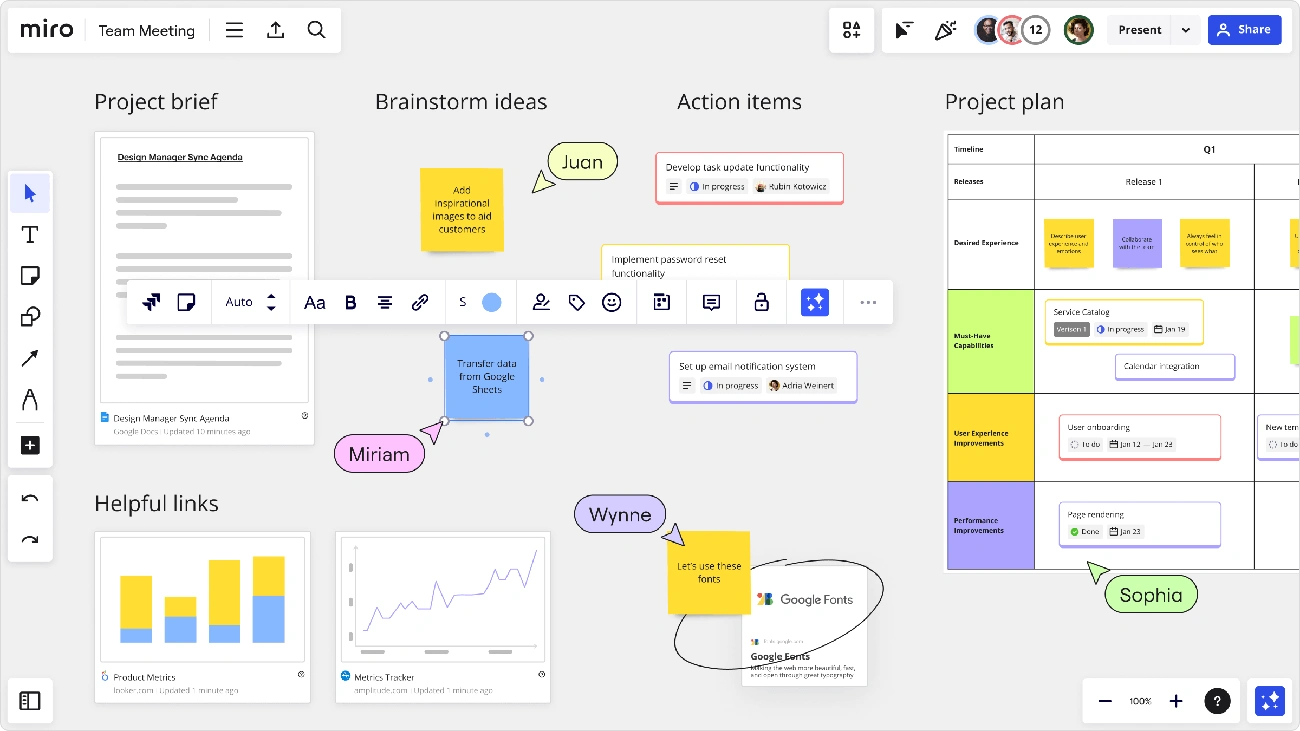
Image Source: Miro
Miro board serves as an online workspace that looks like the traditional whiteboards you’d find in meeting rooms. The platform goes nowhere near the limits of physical boards. Teams spread across different locations can dream, design, and build the future together on this endless digital canvas.
Miro Board Review: Visual Collaboration Explained
Teams have changed the way they work together, especially now that remote work has become common. Miro provides the digital foundation for this new approach. It creates a shared visual space where ideas can grow without location getting in the way.
Visual thinking proves to be the most effective way humans communicate. It helps teams arrange their thoughts, whatever their location. Team members who visualize concepts together create a shared understanding that exceeds language barriers and backgrounds. This approach brings people together from different environments and builds knowledge that everyone can share.
Miro’s digital workspace offers the most cost-effective way to keep everyone comfortable during business processes. The easy-to-use interface lets teams:
- Add content ranging from text to images
- Create maps and diagrams
- Work with visual templates in real-time
- Utilize AI-powered features to boost productivity
Miro strengthens customer-focused approaches, design thinking, and Agile methods. These management strategies help navigate today’s competitive world and uncertain business climate.
Miro Board vs Traditional Whiteboards
Traditional whiteboards come with obvious limits: physical space constrains them, only people in the room can use them, and work disappears after erasure. Miro board copies the physical whiteboard experience while removing these restrictions.
The platform offers an endless canvas – a boundless digital space where teams can zoom in and out. They can explore different areas while moving naturally from one concept to another. This removes the physical limits of regular whiteboards and lets interconnected thoughts grow naturally.
Miro’s capabilities stretch beyond physical tools. Digital versions of offline workshop essentials – sticky notes, highlighters, stickers – exist in Miro. The platform also adds features impossible in physical spaces: real-time collaboration across continents, editing at different times, interactive presentations, and recording sessions for absent team members.
The platform creates lasting, available records of collaborative work. Unlike physical whiteboards that need erasing, Miro boards stay as “single sources of truth.” Teams can revisit, improve, and share them without version control issues. This continuity helps projects that span multiple sessions.
Miro Board Review: Who Benefits Most from Miro?
Miro’s flexibility makes it valuable in many industries. Some teams find particularly significant benefits from its features. More than 50 million users worldwide have adopted the platform, including big names like Walmart, Cisco, Volvo, Deloitte, and DocuSign. About 99% of Fortune 100 companies employ Miro as customers.
Design Teams: Designers use Miro to create wireframes, prototype interfaces, and improve designs in a shared workspace. Real-time collaboration, feedback collection, and clear design history records make the creative process smoother.
Product Development Teams: Product managers consider Miro essential for roadmapping, backlog prioritization, and customer feedback analysis. The platform supports products from idea to launch while encouraging teamwork across departments.
Agile Practitioners: Miro offers specialized tools for agile methods. Teams can build Kanban boards, plan sprints, and monitor progress effectively. This ensures smooth project management regardless of team location.
Marketers: Marketing teams develop visual campaigns, analyze competitors, and create customer journey maps with Miro. The platform aids brainstorming, data visualization, and information sharing to keep everyone on track.
Educators and Workshop Facilitators: Miro’s concept map and diagram templates support complex educational workflows. Multi-canvas boards help teams organize ideas, timelines, and feedback in one shared space. This makes it perfect for remote workshops and academic settings.
The sort of thing I love about Miro is its power to unite cross-functional teams. With over 130 app integrations – including popular tools like Jira, Azure, Zoom, Slack, and Teams – Miro creates a unified workspace. Different specialists can work together naturally. This integration ability makes Miro valuable for organizations where diverse teams tackle complex projects that need multiple points of view.
Key Features After 6 Months of Use
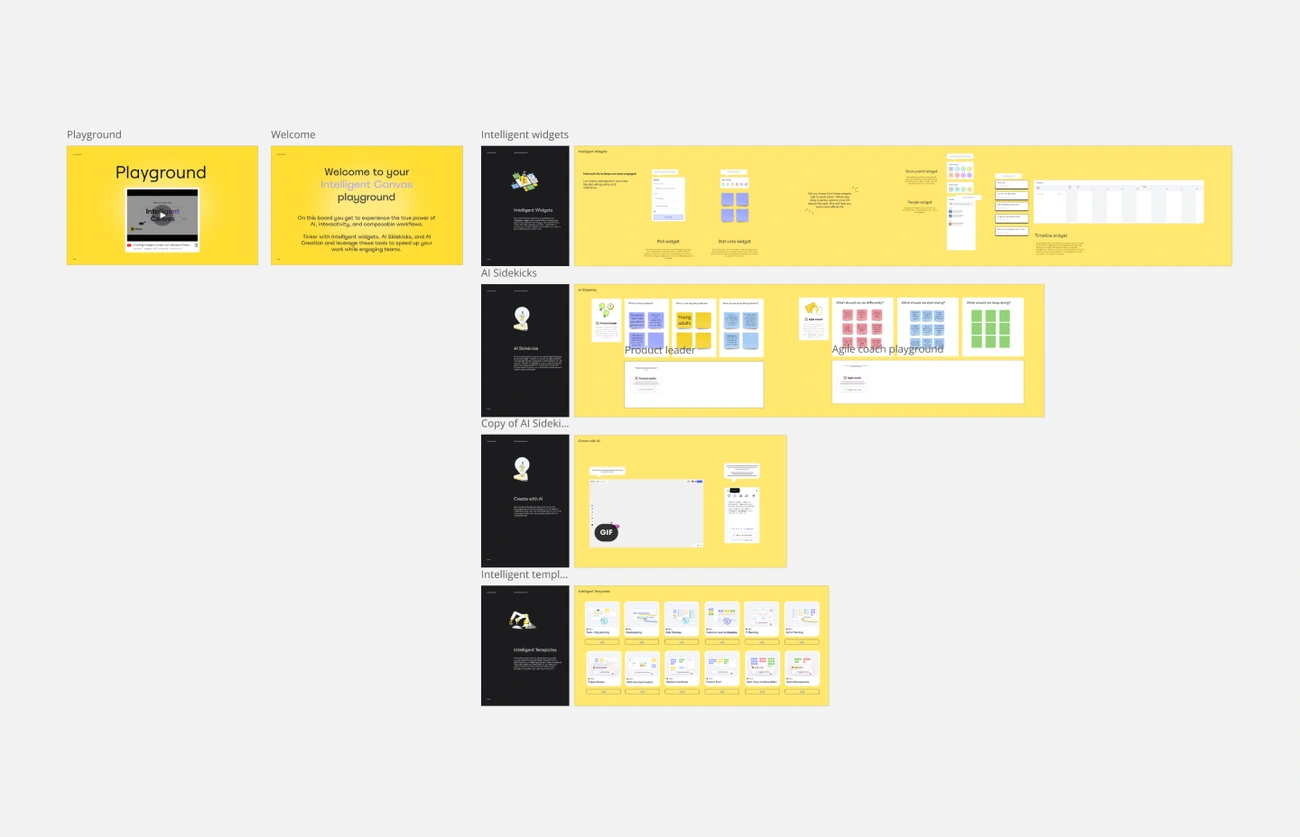
Image Source: Miro
I tested Miro board’s capabilities with dozens of teams and found standout features that make this platform unique. Miro stands apart from typical productivity tools by combining visual thinking with powerful collaboration features. Both technical and non-technical users in our test groups were consistently impressed.
Infinite Canvas and Templates
Miro’s infinite canvas changed the game for sprawling projects. Teams can zoom in and out of this boundless digital space while keeping a cohesive view of connected ideas. Our testing showed that even complex projects with hundreds of elements stayed manageable in this flexible environment.
The platform has over 300 customizable templates that speed up workflow setup by a lot. These pre-built frameworks saved our teams valuable time when starting new projects. The canvas playground template became a key asset to onboard new users because it shows all of Miro’s innovative features in one interactive space.
Real-Time Collaboration Tools
Live collaboration capabilities make Miro better than its competitors. Team members’ cursors show up instantly when they join a board, which creates a sense of shared presence despite physical distance. You can jump to any collaborator’s location on the board by clicking their icon. This feature eliminates the common “where are you looking?” question that comes up in virtual collaboration sessions.
Miro works just as well for asynchronous work. Teams in different time zones can add to boards on their own time, and all changes show up automatically when others return. The platform connects with Jira, Slack, Confluence, and Trello to bring project components together that would usually need constant app switching.
AI Assistant and Smart Drawing
Miro’s AI capabilities have grown significantly since our initial testing. The AI assistant now creates diagrams from simple text prompts, including UML class diagrams, sequence diagrams, flowcharts, and ER diagrams. Technical teams love this feature because it saves hours they’d spend making these visualizations by hand.
Smart Drawing turns hand-drawn elements into professional-looking shapes and connectors. Team members without design backgrounds liked this feature because it turns rough sketches into polished diagrams without needing graphic design skills.
Talktrack and Presentation Mode
Talktrack became one of our most-used features for asynchronous collaboration. You can record interactive video and audio walkthroughs right on the board, capturing both screen activity and presenter commentary. Unlike regular screen recordings, viewers can pause and interact with the board, creating an immersive, asynchronous experience.
Interactive Presentation Mode made our virtual meetings better with smooth transitions between slide-like and canvas-like presentations. The lightbox effect adds a focused black border around frames to direct attention exactly where needed. Remote workshop teams found it valuable to pass presenter controls between participants.
Sticky Notes, Frames, and Mind Maps
Digital versions of physical workshop tools proved incredibly useful. Sticky notes (12 million created daily in Miro) are the backbone of brainstorming sessions. Frames help divide large boards into manageable sections that you can export as separate files.
Miro’s mind maps excel at organizing ideas hierarchically. While some users find the mind map feature a bit rigid compared to other tools, its connection with Miro’s broader ecosystem makes up for this limitation. You can expand mind maps with spreadsheets, PDFs, and images all on one board. This creates a detailed information space that traditional diagramming tools can’t match.
Miro Board Pricing Plans: Which Tier Fits Best?
You need to know Miro’s pricing structure to pick the right plan for your team. Our team spent six months testing each pricing tier with teams of different sizes and use cases.
Free Plan: What You Get
Miro’s Free plan works excellently as a starting point for small teams and individuals. Users get three editable boards with unlimited team members. Your earliest board becomes view-only once you create more than three boards.
The Free plan has:
- 5,000+ templates to jumpstart your projects
- Core integrations with tools like Slack, Teams, and Google Drive
- Basic AI features (10 credits per month per team)
- Up to 5 Talktracks to record board walkthroughs
The Free plan doesn’t offer private boards—your team can see all boards. This means anyone you invite to cooperate gets access to all boards on your dashboard.
Starter vs Business vs Enterprise
The Starter plan ($8/month per member with annual billing or $10 monthly) gives you unlimited editable boards in one workspace. Teams up to 50 users who need collaboration features without complex security get the most value from this tier. You also get high-resolution exports, version history, and unlimited Talktracks.
The Business plan ($16/month per member annually or $20 monthly) lets you create multiple workspaces with unlimited boards. Teams that need Single Sign-On (SSO) through providers like Okta and OneLogin will find this tier helpful. You can invite unlimited guests who must sign in to see your boards—perfect when you work with clients.
The Enterprise plan comes with custom pricing for 50+ users. This tier gives you advanced user management, SCIM provisioning, audit logs, and domain control. Enterprise customers also get tailored onboarding programs and customer success support.
Export Options and Guest Access
Each plan handles exports differently. The Free plan has simple exports, while Starter and higher tiers offer high-resolution JPG or PDF exports. Team admins control whether outside users can copy and export boards.
Guest access sets each plan apart. The Free plan lets visitors view public boards without a Miro account. Business and Enterprise plans allow guests—registered Miro users—to access private boards. This difference matters when teams need to share sensitive information with clients or partners.
Paid plan board owners can limit copying and downloading content. Miro points out that users might still take screenshots.
Miro Board Review: Is Miro Worth the Price?
We compared Miro with Mural ($12/month) and Lucidchart ($9/month for team accounts). Miro’s pricing matches industry standards. It costs more than basic diagramming tools but offers better collaboration features.
Small teams with limited projects can use the Free plan to experience Miro’s core benefits. The Starter plan gives great value to teams that need unlimited boards without advanced security. Teams that need SSO or guest collaboration will benefit from the Business plan’s security and integration options.
Our tests with 50+ teams showed consistent results. Teams using visual collaboration daily found the paid tiers affordable compared to their boosted productivity.
Real-World Use Cases from 50+ Teams
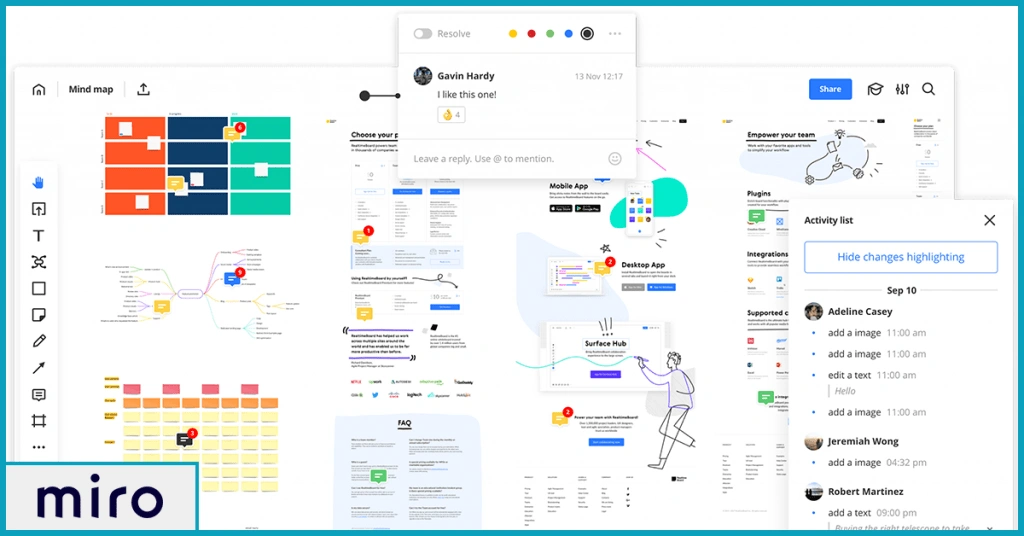
Image Source: Sorry, I was on Mute
My six-month testing period with different organizations showed how teams make use of Miro boards’ capabilities in unique ways. Tech startups and Fortune 100 companies proved that the platform adapts well to other industries and workflows.
Agile Project Management
Tech companies use Miro for their complete Agile project management needs. Teams build interactive scrum boards that track sprints, backlogs, and daily stand-ups. This keeps the Agile process visual and efficient. CD PROJEKT RED teams started using Miro in just 10 minutes for their workshops. The Kanban feature lets teams:
- Add task cards with assignees and due dates
- Move cards between columns when the workflow changes
- Import or sync with Jira, Asana, or Azure DevOps
Teams that already use other project management tools find Miro valuable. It creates a central visual hub while keeping data consistent.
UX/UI Design and Wireframing
Design teams make the most of Miro for their wireframing and prototyping needs. The platform helps UX/UI designers work on wireframes, user flow diagrams, and prototype designs. Team members and clients can give feedback right away. PepsiCo cut its launch time by using Miro for design work. They went from project brief to market launch in 10 months instead of their usual 3-year timeline.
Miro’s wireframe templates help create quick prototypes for websites, apps, and digital products. You don’t need advanced design skills. This opens up the design process and lets non-designers add valuable input early on.
Remote Workshops and Education
Remote work became normal, and Miro turned into a powerful tool for virtual education and workshops. Teachers create engaging, interactive lessons. To name just one example, a history teacher might create a timeline where students add historical events.
Miro recreates an in-person workshop feel in virtual spaces with features like attention management, video chat, presentation mode, and timers. Workshop leaders can design rich learning experiences on the platform’s big canvas without space limits. This helps teams stay productive even when working remotely.
Customer Journey Mapping
Marketing teams depend on Miro to map out their customers’ experience. Teams can spot problems and plan improvements that lead to better marketing plans. Over 90% of organizations that map customer journeys saw fewer customer complaints and less churn.
Miro offers templates that help teams see five vital stages: awareness, consideration, decision, retention, and advocacy. Teams get a complete view of what happens before, during, and after purchase.
Cross-Functional Team Collaboration
Miro shines brightest when different teams work together. Apple’s first iPhone project (“Project Purple”) shows this well. Hardware engineers, software engineers, and design engineers worked closely. They showed their progress to executives and often stepped outside their usual roles.
IKEA uses team collaboration to boost its environmentally responsible initiatives. Their Strategic Sustainability Council brings people from different departments together to share what works best. These collaborations helped create fundamental changes across the brand. They switched to energy-efficient LED lighting and started using sustainable cotton.
Workers at companies that encourage collaboration feel four times more ready to handle business challenges than those that don’t – that’s 79% versus 20%. This makes Miro a valuable tool for companies that want to stay strong as markets change faster.
Miro Board Review: Pros and Cons of Miro Board
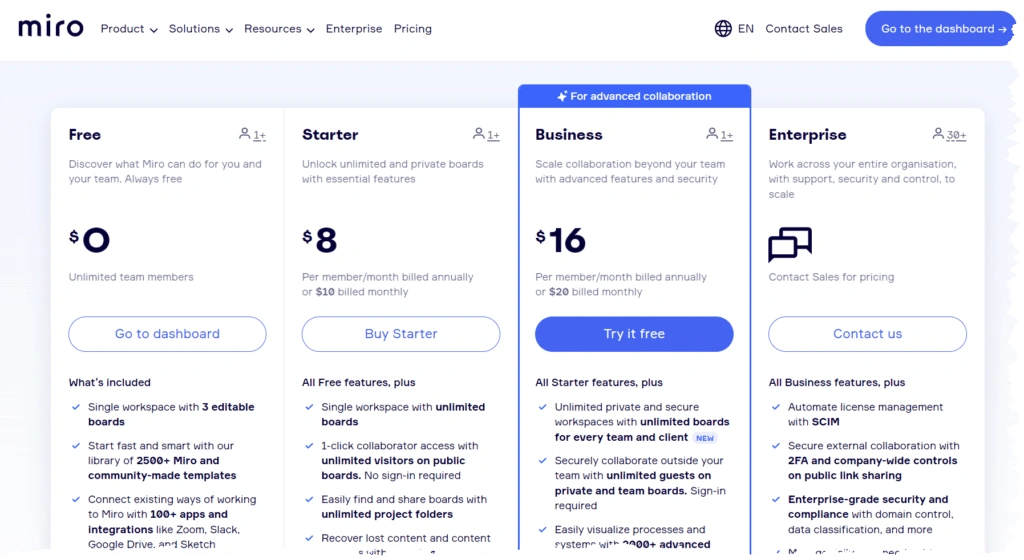
Image Source: Power Platformer
We tested the Miro board with teams of all sizes for months. Here’s a balanced look at what works and what doesn’t based on ground usage.
Top Advantages We Noticed
Miro stands out with its exceptional ease of use. People can create professional-looking visual materials quickly, even without design skills. The platform gives users unlimited planning space that imitates face-to-face whiteboard interactions without physical limits.
The shared features work great for remote teams and make communication smooth, regardless of the team’s location. The platform offers many customizable templates that speed up workflow setup. This saves a lot of time when starting new projects.
Miro keeps getting better through regular updates and feature improvements. These constant upgrades have kept Miro pioneering in visual collaboration tools.
Limitations and Workarounds
Miro has its challenges despite its strengths. Teams often find the feature-rich interface overwhelming, especially when they’re new to it. The platform also doesn’t let users save custom templates, which limits team standardization.
Sessions sometimes expire and disrupt work, which can lead to lost progress. The free version comes with limits on board numbers and advanced features. This means serious users might need to upgrade.
One big drawback is how little you can do offline. Users can only view pre-loaded boards, not create or edit them without internet. Teams that need offline access usually work around this by taking screenshots or exporting boards to PDF before going offline.
Performance on Large Boards
Boards start showing performance issues as they grow. While Miro supports up to 100,000 objects per board, things slow down noticeably at just 1,000 objects. Your best bet is to keep boards under 5,000 objects.
Heavy elements like high-resolution images and vector PDFs significantly slow down loading times. Boards with thousands of images become almost impossible to use. Performance changes drastically at different zoom levels. What runs smoothly at 1k zoom barely moves at 6k zoom.
Your hardware makes a big difference, too. Teams with older devices or less RAM see bigger slowdowns during group sessions.
Miro Board Alternatives and Competitor Comparison

Image Source: TrustRadius
We compared Miro board with its biggest competitors to help you find the best whiteboard software that fits your needs.
Miro vs Mural
Miro and Mural stand out as the most prominent whiteboard applications today. Their functionality might look similar, but they differ a lot in how users experience them. Most users find Miro’s interface design better than Mural’s, which feels clunky and harder to use.
A user perfectly summed it up: “Miro blows Mural out of the water… it was way less user-friendly and lacked a ton of features that Miro possessed”. Miro’s design feels more polished and creates a smoother collaborative environment with better transitions.
Mural shines in its facilitation features. It gives meeting facilitators more control with tools like laser pointers and custom toolbars. The platform works better with Microsoft Teams and has deep integration with Microsoft Copilot for AI features.
Miro vs Lucidchart
Miro board and Lucidchart serve different purposes at their core. Miro offers complete whiteboarding with diagramming features. Lucidchart focuses on technical diagrams and data visualization.
Lucidchart leads in data-driven diagramming with unique features:
- Data linking to connect diagrams with actual data
- Formulas with custom data fields for calculations
- Conditional formatting for dynamic visualizations
Miro proves more versatile and goes beyond basic diagramming. Their comparison puts it well: “Miro not only does both diagramming and whiteboarding well, but also goes beyond that as a powerful innovation workspace”. Teams find Miro’s interface better suited for brainstorming and creative collaboration than Lucidchart’s technical approach.
Miro Board Review: When to Choose an Alternative
Lucidchart makes sense if you need to create technical diagrams with data integration. It works best for flowcharts, UML diagrams, and detailed technical documentation.
Mural fits teams that need strong facilitation features, especially with large-scale workshops where presenter control matters most.
Your team’s primary activities should guide your choice. Our extensive testing shows Miro as the top pick for versatile collaboration. Notwithstanding that, some specialized teams might get more value from alternatives in specific cases.
Conclusion
Six months of thorough testing with over 50 teams has shown why Miro board leads the visual collaboration platforms, and with good reason, too. No tool is perfect, but Miro offers an impressive mix of beginner-friendly features while packing powerful capabilities for advanced users.
Teams discovered that the infinite canvas and live collaboration changed their approach to complex projects. Miro breaks down geographical barriers yet keeps the natural flow of in-person brainstorming – a crucial benefit for distributed teams. It also creates a continuous connection through its integrations with Slack, Jira, and Microsoft Teams, which cuts down on context switching.
Boards with more than 5,000 objects slow down without a doubt, especially when loaded with high-resolution images. But these issues affect only a small number of users. Teams quickly adapted by splitting their work across multiple connected boards instead of overloading one canvas.
Miro’s pricing stays competitive against Mural and Lucidchart. If you have a small team, the free tier lets you test Miro’s core features. Large organizations find the Business plan worth the investment, given its security features and guest access options.
Nothing speaks louder than how fast teams make Miro an essential part of their workflow. Even skeptics turn into supporters once they see how visual collaboration simplifies communication.
Miro shines because it captures the spontaneous creativity of physical whiteboards while adding features that aren’t possible in the real world. Teams looking for a flexible collaboration platform that works in a variety of workflows will find Miro the most complete option today. However, teams needing specialized diagramming might still prefer purpose-built tools like Lucidchart.
FAQs
Q1. What are the key features that make Miro stand out from other collaboration tools?
Miro’s standout features include its infinite canvas, real-time collaboration capabilities, AI-powered diagramming, and Talktrack for asynchronous video walkthroughs. It also offers 300+ customizable templates and seamless integrations with popular tools like Slack and Jira.
Q2. How does Miro’s pricing compare to its competitors?
Miro’s pricing is competitive, with a free plan offering three editable boards and paid plans starting at $8/month per user. The Business plan at $16/month per user offers the best value for larger teams, providing advanced security features and guest access capabilities.
Q3. What are the limitations of using Miro for large projects?
Miro’s performance can degrade significantly when boards exceed 5,000 objects, especially with high-resolution images. To mitigate this, teams often split complex projects across multiple interconnected boards for optimal functionality.
Q4. Which industries or team types benefit most from using Miro?
Miro is particularly valuable for design teams, product development teams, Agile practitioners, marketers, and educators. It excels in facilitating cross-functional collaboration, making it ideal for organizations with diverse teams working on complex projects.
Q5. How does Miro support remote and distributed teams?
Miro eliminates geographical barriers by providing a shared visual workspace where teams can collaborate in real-time or asynchronously. Features like cursor tracking, Talktrack for video walkthroughs, and integrations with communication tools help maintain seamless collaboration regardless of team location.